
A dispatcher should not have to guess which crew received a call, where the closest unit is, or whether an emergency alert reached the right people. That is where the best DMR features for dispatch make a measurable difference. A properly designed Digital Mobile Radio system gives supervisors clearer visibility, gives field teams faster access to the right talkgroup, and helps keep routine traffic from burying urgent communications.
For fleet, facilities, construction, hospitality, agriculture, and event operations, the right features are not necessarily the longest feature list. The best fit depends on how many users share the system, the size of the coverage area, whether teams work indoors or across wide outdoor properties, and how dispatch is handled. A single-site operation may need reliable group calling and emergency buttons. A multi-crew fleet may also need GPS, status messaging, call recording, and a dispatch console.
Best DMR Features for Dispatch: Start With the Call Flow
Before selecting radios or software, map out what happens during a normal shift. Who originates work orders? Which teams need to hear them? Do supervisors need to monitor all traffic, or only major incidents? What should happen when a worker declares an emergency?
That exercise usually identifies the most valuable DMR functions quickly. Dispatch performance is built around a clean call flow: the dispatcher reaches the appropriate group, the assigned team acknowledges the call, and everyone else can continue working without unnecessary radio traffic. DMR supports that structure through individual calls, group calls, designated channels or talkgroups, and system-level priority settings.
Group Calling and Talkgroup Organization
Group calling is the core dispatch feature for most organizations. Instead of placing every user on one busy channel, dispatch can call a defined group such as Maintenance, Security, Dock Crew, Housekeeping, Drivers, or Event Operations. Users hear the traffic relevant to their job, while supervisors can be given access to multiple groups.
The design matters as much as the feature itself. Too many talkgroups can confuse users in the field. Too few can create congestion and force unrelated teams to listen to each other. In many operations, a practical setup includes a main operations group, separate department groups, and one monitored emergency group.
A good radio template also uses plain-language channel names. “North Yard” is more useful to a driver than “Channel 3,” particularly when personnel rotate, work overnight shifts, or need to act quickly under pressure.
Individual Calls, All-Call, and Dispatcher Overrides
Individual calling lets a dispatcher contact one radio without tying up an entire workgroup. This is useful for sensitive conversations, follow-up instructions, or checking on a specific employee. It can reduce routine traffic significantly when dispatchers handle frequent small requests.
All-call capability is valuable when everyone needs the same information, such as a weather warning, evacuation instruction, site closure, or major operational change. Because an all-call interrupts normal work, it should be reserved for announcements that genuinely require broad attention.
Some DMR systems can support priority calling or preemption, allowing designated users to take priority over lower-level traffic. This is especially useful for security leads, safety personnel, and dispatch supervisors. However, the programming and behavior vary by manufacturer and system design. Priority settings should be tested in the actual operating environment so a high-priority call does not create confusion or unexpectedly block essential routine traffic.
Emergency Features That Give Dispatch a Clearer Picture
An emergency button is one of the most useful DMR safety features, but it is only effective if the system is configured with a defined response plan. When activated, the radio can send an emergency alert to dispatch, identify the radio or user, and place the device into an emergency mode. Depending on the equipment and programming, it may also transmit an emergency call or open the microphone automatically.
For lone workers, consider radios that support lone-worker timers and man-down alerts. A lone-worker timer prompts the user to respond at a set interval. A man-down function can send an alert when a radio detects an unusual angle or lack of motion. These tools are not substitutes for a safety program, and they require careful adjustment to avoid false alerts. They can be valuable for security patrols, maintenance personnel, utility crews, and workers operating in isolated areas.
Emergency procedures should be simple enough to use under stress. Dispatchers need to know what the alert means, which channel to monitor, who is responsible for escalation, and how to document the incident. A feature is only useful when the people behind the console know what action it triggers.
GPS, Status Messages, and Text for Better Resource Decisions
For mobile teams, GPS location reporting can turn dispatch from a voice-only operation into a better-informed decision process. A dispatcher can see which unit is near a service call, confirm that a vehicle arrived at a site, or determine whether a crew has moved out of a restricted area.
Location data should be configured around the work, not simply set to the fastest possible update rate. Frequent updates provide a more current view of moving vehicles, but they can increase system traffic and affect battery life. For a large campus, updates every few minutes may be adequate. For active fleet dispatch or security patrols, shorter intervals may be justified.
Status messaging gives users a fast alternative to routine voice updates. A driver can select “Available,” “At Customer,” “Fuel Stop,” or “Out of Service.” A maintenance technician can send “Job Received,” “Working,” or “Complete.” These standard messages improve consistency, reduce air time, and allow dispatch to see work progress without repeatedly asking for updates.
Text messaging is helpful when details need to be preserved, including gate codes, unit numbers, street addresses, task notes, and customer instructions. It is not ideal for urgent instructions that require immediate acknowledgment. Voice remains the better choice when timing is critical or a team is actively moving.
Dispatch Console and Call Recording Capabilities
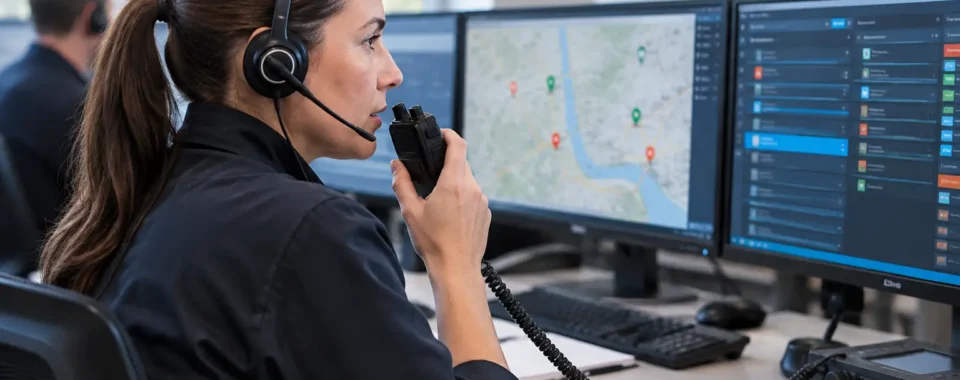
A radio network becomes much easier to manage when dispatch staff have a purpose-built console. Depending on the system, a console may display active talkgroups, radio IDs, GPS locations, emergency alerts, message history, and user status. It can also let a dispatcher make group or individual calls from a desktop microphone and speaker setup rather than carrying a handheld radio throughout the day.
Call recording can be useful for incident review, training, service verification, and resolving misunderstandings about assignments. It also creates responsibilities. Organizations should establish who may access recordings, how long they are retained, and whether state or local notice requirements apply. Recording policies should be reviewed with appropriate legal or compliance personnel, particularly where customer, employee, or public communications are involved.
For smaller operations, a full console may not be necessary. A well-programmed base radio with an external speaker, desk microphone, and properly assigned talkgroups can be an effective dispatch position. The right answer depends on call volume and how much real-time visibility the dispatcher needs.
System Capacity, Coverage, and Audio Quality Still Matter
DMR’s two-slot TDMA design can allow two simultaneous voice paths on a single 12.5 kHz repeater channel. For dispatch operations, that can improve capacity compared with older analog arrangements. One slot might carry routine operations while another supports a separate workgroup, data, or a different call path. Actual capability depends on the radios, repeater, programming, and system architecture.
Capacity does not fix weak coverage. Warehouses with steel racking, hospitals with reinforced construction, remote properties, parking structures, and large outdoor facilities may need site testing, antenna work, additional repeaters, or a different coverage approach. A radio that works well in the loading area but fails in the far building is not a dispatch solution.
Audio accessories deserve the same attention. Vehicle microphones, remote speaker microphones, headsets, earpieces, and noise-canceling options can determine whether a message is understood near engines, machinery, crowds, or wind. Clear audio prevents repeats, and fewer repeats keep dispatch channels available.
Security, Radio Management, and Interoperability
DMR systems can support features such as radio authentication, remote inhibit, and, on compatible equipment, encryption. These may be appropriate for organizations handling sensitive operations or wanting to disable a lost radio. Encryption introduces trade-offs: every authorized radio must be properly loaded and managed, and encrypted traffic may limit interoperability with outside agencies or mutual-aid partners.
Remote radio management can also save time as teams grow. Features such as radio check, remote monitor where permitted and appropriate, and over-the-air programming can help administrators verify device status and update selected settings without collecting every radio. Over-the-air changes should be planned carefully, especially for critical channels, because a programming mistake can affect an entire group of users.
The practical goal is simple: give dispatch enough control to manage the operation without creating a system so complicated that users cannot confidently operate it.
A short on-site coverage test and a real dispatch workflow review will reveal more than a feature checklist ever can. When the radios, talkgroups, console, and emergency procedures are designed around the actual work, dispatch becomes calmer, faster, and far more dependable when it counts.